When a Website Isn’t Enough: Why Growing Businesses Turn to Custom Web Applications
The Quick Answer:
A custom web application is browser-based software developed specifically around the needs of a business or organization. Unlike off-the-shelf software, it can be designed to automate unique workflows, connect existing systems, manage data, create customer or employee portals, streamline operations, and support business processes that standard software cannot handle efficiently.
Your Business Shouldn’t Have to Work Around Your Software
Most businesses don’t begin by building custom software.
They start with what already exists. A website handles marketing. A spreadsheet tracks projects. A CRM manages leads. Another program handles invoices. Employees communicate through email, customers submit forms, and somewhere along the way someone manually moves information from one system into another.
At first, it works. Then the business grows. More customers create more data. More employees create more processes. New services require new workflows. Systems that once saved time begin creating extra steps because they were never designed to work together.
Before long, employees are maintaining spreadsheets nobody completely trusts, entering the same information into multiple platforms, searching through email threads for project updates, and creating workarounds for software that almost, but not quite, does what the company needs.
That’s often the point when a business starts asking a different question.
Instead of:
“What software can we buy?”
The question becomes:
“Why can’t we build software that works the way we do?”
That’s where custom web applications enter the picture. A custom web application is designed around a company’s specific processes, customers, data, and objectives. Rather than forcing the organization to adapt to the limitations of generic software, the software adapts to the organization.
For a growing business, that difference can change everything.
Table of Contents
1. Your Business Shouldn’t Have to Work Around Your Software
2. What Is a Custom Web Application?
3. When Off-the-Shelf Software Stops Working
4. What Custom Web Applications Can Do
5. How Custom Applications Change the Way Businesses Operate
6. Planning a Custom Web Application
What Is a Custom Web Application?
A custom web application is software that runs through a web browser but is designed specifically around the requirements of a particular business, organization, workflow, or user group.
Unlike a traditional website, which primarily presents information and guides visitors through content, a web application allows users to perform tasks. They might log into an account, manage projects, submit information, generate reports, track orders, approve documents, communicate with a company, calculate results, or interact with data in real time.
You probably use web applications every day without thinking of them that way. Online banking platforms, project management systems, customer portals, scheduling platforms, inventory systems, dashboards, and cloud-based accounting software are all examples of web applications.
The difference with custom web application development is that the software isn’t built for millions of unrelated businesses. It’s built around one company’s or industry-specific requirements.
That distinction matters because every organization eventually develops its own way of working. Processes evolve around customers, employees, products, regulations, reporting requirements, and years of operational experience. Generic software has to serve a broad audience, so it may handle 80 percent of what a business needs extremely well while creating frustration around the remaining 20 percent.
Custom development focuses on that missing 20 percent, and often redesigns the entire process around efficiency.
A Website Communicates. A Web Application Does.
The easiest way to understand the difference is to think about what the visitor is expected to accomplish.
A traditional website might explain a company’s project management services and include a form where someone requests more information.
A custom web application might allow that company’s clients to log in, view every active project, upload files, approve work, communicate with their project manager, review invoices, and see upcoming deadlines.
One communicates; the other performs. That doesn’t mean they’re separate worlds. In many cases, a company’s website and custom application work together. The public-facing website attracts and educates customers while the application handles deeper interactions after someone becomes a lead, client, employee, vendor, or partner.
This is especially powerful when the two are intentionally designed as part of the same digital ecosystem. Visitors don’t feel like they’re jumping between unrelated systems. The branding, navigation, and experience remain consistent while the functionality changes based on what the user needs to accomplish.
When Off-the-Shelf Software Stops Working
Off-the-shelf software is extremely valuable. Businesses should not build custom software simply because they can.
Platforms such as CRMs, project management systems, accounting software, ecommerce tools, and scheduling applications solve common problems efficiently because development costs are distributed across thousands or millions of customers.
If existing software solves the problem well, using it is usually the smarter choice. The difficulty begins when the business starts spending more time working around the software than benefiting from it.
Employees create spreadsheets to track information the platform can’t handle. They copy data from one system into another because integrations are limited. Customers email updates because the available portal doesn’t provide what they need. Managers assemble reports manually because information lives across several different platforms.
None of these problems may seem severe individually.
Together, they create operational drag.
The Spreadsheet That Quietly Became Mission-Critical
Almost every growing business has one.
It began as a simple spreadsheet.
Someone created it to solve a temporary problem. Over time, columns were added. Formulas became more complicated. Multiple employees began relying on it. Eventually, the spreadsheet started managing an important part of the business.
Perhaps it tracks inventory, Maybe it manages projects, It could calculate commissions, monitor customers, schedule production, or organize quotes.
Then problems begin. Someone accidentally deletes a formula. Two employees edit different copies. Data becomes inconsistent. Access permissions become difficult to control. Reporting requires hours of manual work.
At that point, the spreadsheet is no longer a convenient tool. It has become unofficial business software.
Custom web applications often begin by taking processes like these and turning them into structured systems. Instead of relying on cells and formulas, the business gains controlled access, automated calculations, searchable records, user roles, reporting, and workflows specifically designed around the information employees need.
The goal isn’t replacing spreadsheets simply because they’re spreadsheets. It’s recognizing when a temporary solution has become too important to remain temporary.
When Five Platforms Are Doing the Job of One
Another warning sign appears when businesses accumulate disconnected software.
The sales team uses one CRM. Operations uses project management software. Accounting works from another platform. Customer service manages a separate ticketing system. Important files live in cloud storage. Leads arrive through the website or by email. Each platform may perform its own job well, the problem is everything happening between them.
Employees become the integration. Someone exports a CSV file, then someone else uploads it. Customer information gets copied into another system. A status changes, but another department doesn’t know about it.
The technology is technically working, yet people are spending hours keeping the systems synchronized. A custom application doesn’t necessarily need to replace every piece of software. In many cases, the smarter solution is connecting them through a centralized interface or automated workflow.
The objective isn’t to build everything from scratch. It’s to make everything work together.
Total Teck Perspective
Custom development shouldn’t begin with the assumption that your existing software needs to be replaced. We first look at how the business actually operates, where information gets stuck, where employees repeat work, and which existing systems are already doing their jobs well. Sometimes the right solution is a completely custom platform. Other times it’s a custom application that connects the technology you already use.
What Custom Web Applications Can Do
The phrase custom web application can sound abstract because there’s no single list of features that defines one.
That’s actually the point. Custom applications are valuable precisely because they aren’t limited to a predetermined feature list. They’re designed around a problem.
For one company, the solution may be a customer portal. For another, it might be an inventory management platform. A third may need an internal dashboard that consolidates data from several systems.
The technology changes depending on the challenge. Several categories, however, appear frequently.
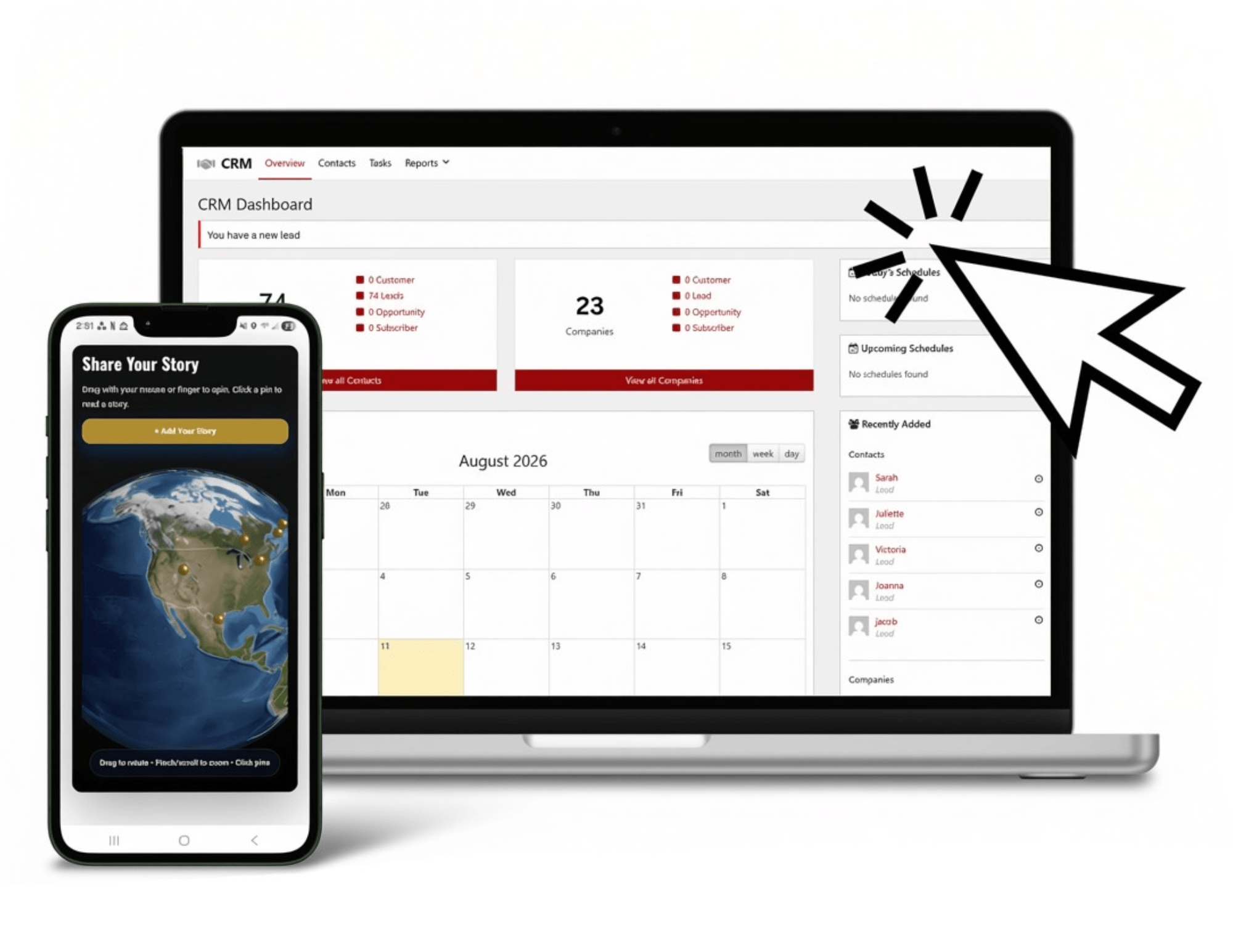
Custom CRM
A custom CRM creates a secure, centralized system where a business can manage customer relationships, track interactions, and organize all client-related data without relying on disconnected tools, spreadsheets, or generic off-the-shelf platforms.
Depending on the organization, a custom CRM might be used to manage leads, track sales pipelines, store customer history, log communications, assign follow-ups, manage opportunities, generate reports, or connect customer data across multiple departments and systems.
The benefit goes beyond organization. A well-designed custom CRM reduces repetitive administrative work while giving teams complete visibility into every customer relationship. Instead of searching through emails, spreadsheets, and separate software tools, employees can access a single source of truth for every interaction.
- Instead of manually updating multiple systems, information flows automatically through structured workflows.
- Instead of guessing the status of a deal or customer request, teams can see real-time updates in one place.
That improves internal efficiency while helping businesses respond faster, stay organized, and deliver a more consistent customer experience.
POS Systems
Businesses often think of point-of-sale (POS) systems as simple checkout tools, but in reality they sit at the center of day-to-day operations for many retail, hospitality, and service-based businesses.
A custom POS system can bring sales, inventory, customer data, and reporting into a single interface designed specifically around how a business actually operates.
A cashier may see a fast, streamlined checkout screen with product search, discounts, and payment options. A manager may see real-time sales performance, staff activity, inventory levels, and daily revenue breakdowns. An owner may see multi-location reporting, product performance trends, and customer purchasing behavior.
The underlying data may come from in-store transactions, online sales, or integrated third-party systems.
The POS system provides the operational context. Instead of relying on separate tools for sales, inventory, and reporting, the system connects everything at the point where transactions actually happen. Better visibility at the point of sale leads to better decisions across the entire business.
Ticketing Systems
Many event-based businesses follow predictable stages.
A customer discovers an event. They purchase a ticket through the website. On the day of the event, the customer arrives and is checked in using a mobile app.
Without a structured system, these steps are often managed through disconnected tools, separate payment processors, manual spreadsheets, printed guest lists, and ad-hoc check-in methods that slow down entry and create confusion at the door.
A custom ticketing system can formalize the entire experience. Ticket purchases are handled directly through the website, inventory is updated in real time, and each ticket is automatically linked to a secure digital record. Staff can then use a mobile check-in app to scan or verify tickets instantly at the venue entrance.
Each stage triggers the next action automatically. Customers receive confirmations and tickets immediately after purchase. Event staff can see live attendance data. Capacity limits are enforced automatically. Managers can monitor sales and check-in activity in real time to prevent bottlenecks and overselling.
The entire event flow becomes visible and controlled instead of fragmented across multiple systems and paper lists.
That’s especially important as events scale, because managing high volumes of attendees through manual processes quickly becomes unreliable and difficult to coordinate in real time.
Custom Calculators and Estimators
Not every application needs to become an enormous software platform. Sometimes a focused tool creates substantial value.
A custom calculator might generate pricing estimates, model investment returns, evaluate financing options, determine product specifications, calculate quantities, or provide recommendations based on information supplied by the user.
These tools can serve customers, employees, or both.
A visitor might use a calculator on the website to understand whether a service fits their budget. A salesperson might use an internal version to create consistent estimates. The information could then flow directly into the CRM or quoting process.
Instead of calculating results manually, the business turns institutional knowledge into software.
Scheduling and Resource Management
Standard calendar systems work well when scheduling is simple.
They become less effective when businesses need to account for employees, equipment, locations, travel time, certifications, availability, project duration, or other operational constraints.
A custom scheduling application can incorporate those business-specific rules.
Rather than simply finding an open time on a calendar, the system can determine whether the necessary resources are actually available.
For organizations managing field teams, equipment, facilities, deliveries, or complicated appointment types, that distinction can dramatically reduce scheduling errors and administrative work.
Inventory and Product Management
Inventory becomes complicated quickly when products have variations, multiple locations, supplier relationships, production stages, or specialized tracking requirements.
Generic inventory platforms can solve many of these problems, but specialized businesses sometimes operate under rules standard software was never designed to accommodate.
A custom application can reflect those exact requirements. It might track raw materials through production, coordinate inventory across locations, connect warehouse data with ecommerce orders, automate reorder alerts, or provide employees with a simplified interface tailored to their responsibilities.
The objective isn’t more software. It’s better visibility and fewer errors.
How Custom Applications Change the Way Businesses Operate
The most valuable impact of custom software rarely comes from a single feature. It comes from eliminating friction across hundreds or thousands of small interactions.
Consider a process that requires an employee to copy information from an email into a spreadsheet, then enter the same information into a CRM, notify a manager, create a folder, schedule a follow-up, and send the customer a confirmation.
Each step may only take a few minutes. Multiplied across hundreds of customers, those minutes become hours. Multiplied across years, they become enormous operational costs.
A custom application can turn that chain of manual actions into a single workflow. The customer submits information once. The system takes care of the rest.
Automation Isn’t About Removing Employees
This distinction matters.
Business automation is often discussed as though its primary objective is reducing headcount. In many organizations, the greater opportunity is increasing the capacity of the people already there.
An employee who spends ten hours each week copying data isn’t using those ten hours to solve customer problems, develop new business, improve operations, or perform the work they were actually hired to do.
Automation gives those hours back. The business can grow without administrative work growing at exactly the same rate.
That changes scalability. Instead of hiring another person every time volume increases, the company can first ask whether repetitive work can be handled more efficiently. Software doesn’t eliminate the importance of people. It makes their time more valuable.
Better Data Creates Better Decisions
Disconnected systems create another problem: unreliable information. When data lives in multiple places, it rarely stays consistent for long. Sales reports show one number, accounting shows another, and a spreadsheet someone built last month contains something slightly different again. Over time, teams stop trusting the data entirely because nobody is fully sure which version is actually correct or up to date.
Custom applications help solve this by creating a more centralized and structured flow of information. Instead of data being manually copied between tools, it is captured once and shared across the systems that need it. This doesn’t mean everything has to live in a single database, but it does mean the business defines how information moves, where it comes from, and which version should be considered the source of truth.
When that structure is in place, decision-making becomes significantly easier. Leadership can view accurate, real-time metrics without spending hours reconciling reports or chasing updates from different departments. Problems become visible sooner, opportunities are easier to spot, and decisions are based on reliable information rather than assumptions or instinct.
Consistency Becomes Built Into the Process
Growing companies often struggle with consistency.
Experienced employees know exactly how something should be done, while newer team members are still learning. Steps get skipped. Required information is forgotten. Different departments develop slightly different versions of the same process.
Software can create guardrails. If five pieces of information are required before a project advances, the application can require them. If a manager must approve a specific type of request, the workflow can automatically route it. If a task needs to occur three days before a deadline, the system can trigger it.
Instead of hoping everyone remembers the process, the process becomes part of the application. That reduces errors and makes onboarding easier as teams grow.
Total Teck Perspective
Some of the best custom software projects begin with a sentence like, “We do this manually every day.” That usually signals an opportunity. When a repetitive process is predictable, rule-based, and important to the business, there’s often a way to make the technology carry more of the workload.
Planning a Custom Web Application
Custom development offers a lot of flexibility, but that flexibility also comes with responsibility. Without proper planning, businesses can easily invest heavily in features they don’t actually need. Successful projects always start by clearly defining the problem first, before any technology decisions are made.
In most cases, the first version of an application should not try to solve everything at once. Instead, it should focus on solving the most important problems as effectively as possible.
Start With the Bottleneck
A useful starting point is asking a simple question:
where does work slow down today?
This could be leads not being followed up quickly enough, or project information being scattered across multiple systems. It might be employees spending too much time building reports, or customers repeatedly asking for information they should already have access to. In other cases, inventory mistakes may be causing delays and unnecessary costs.
These are real, observable problems that often can be measured. Because of that, they give the development team a clear direction to work from.
Saying “we need an app” is not a strategy. A much stronger approach is something like, “we want to reduce the time our project managers spend manually preparing client status reports.” The clearer the problem is defined, the easier it becomes to design a solution that actually works.
Map the Existing Process Before Rebuilding It
Before automating anything, it’s important to understand how the current process actually works. This step is often overlooked, but it usually reveals that different teams describe the same workflow in completely different ways. In some cases, departments may even be using unofficial workarounds that others are not aware of.
Mapping the process helps uncover these gaps and inconsistencies. It clarifies where information starts, who interacts with it, what decisions are made, and which systems are involved. It also highlights where delays happen, which steps are repetitive, and where human judgment is truly required.
This understanding is essential for deciding what should be automated and what should remain manual. Not every process should be replaced with software, and in some cases, the workflow itself needs to be improved before any development begins.
Build the Essential Version First
Custom applications are especially prone to feature creep. Once a company sees what is possible, new ideas tend to appear quickly. Questions like adding inventory management, mobile apps, customer messaging, automated reports, or vendor portals often come up early in the process.
While many of these ideas may be valuable, they don’t all need to be included in the first version.
A better approach is to focus on building the smallest version of the application that still delivers real business value. Once that foundation is in place, it can be launched, used in real conditions, and improved based on actual user behavior rather than assumptions.
This approach reduces risk and prevents overbuilding. It also allows the system to evolve naturally alongside the business. The most effective custom applications are rarely finished products; they grow and adapt as the organization changes.
Building for Growth, Integration & Automation
A custom application should solve today’s problem without creating tomorrow’s limitations. This means thinking beyond individual features and focusing on how the system will scale as the business grows.
Questions like how new users will be added, whether new workflows can be introduced, what happens when the company expands to new locations, and how the system will connect with future tools all need to be considered early.
The goal isn’t to predict every future requirement perfectly, but to design in a way that avoids unnecessary restrictions later on.
Integrations Can Be More Valuable Than Replacements
Custom development doesn’t always mean replacing existing software. In many cases, the better approach is to connect the tools a business already relies on. If systems like accounting, CRM, or ecommerce platforms are working well, they can remain in place while a custom application acts as the central layer that ties everything together.
This allows data to move smoothly between systems, for example, from an online order into production, inventory, and accounting, without forcing the business to abandon reliable tools. The result is a more unified workflow without unnecessary disruption.
Security and Permissions Have to Be Planned Early
As a system grows in value, security becomes increasingly important. Custom applications often store sensitive business and customer data, so access must be carefully controlled from the beginning.
Different users need different levels of visibility, whether they are employees, managers, customers, or administrators. These permission structures should be designed during the planning stage rather than added later. Security also includes areas like hosting, backups, authentication, updates, and integrations, all of which need to be handled responsibly to protect the system as a whole.
Custom Software Should Make Complexity Feel Simple
Even though custom applications can involve complex systems behind the scenes, the user experience should remain simple and intuitive. Employees should immediately know what actions need attention, customers should be able to find their information without confusion, and managers should be able to understand overall performance at a glance.
The complexity of workflows, data, and integrations should be handled in the background so that the interface feels clear and easy to use. This ability to simplify complexity is what separates functional software from software that people genuinely rely on.
Where Custom Web Applications Create the Greatest Value
Custom development isn’t automatically the right investment for every organization. It tends to deliver the strongest returns where one or more of the following conditions exist:
- The company has unique processes that generic software handles poorly.
- Employees perform significant amounts of repetitive administrative work.
- Important information is scattered across multiple systems.
- Customers need secure self-service capabilities.
- Spreadsheets have become critical operational tools.
- Existing software requires constant workarounds.
- The business has reached a level of complexity that manual processes can no longer handle efficiently.
- Automation could allow the company to grow without administrative costs increasing at the same rate.
The common denominator is friction. When operational friction becomes expensive enough, custom software begins looking less like a luxury and more like infrastructure.
The Short Answers:
1. What is a custom web application?
A custom web application is browser-based software built specifically around the needs of a particular business or organization. It can manage data, automate workflows, connect systems, create customer portals, generate reports, schedule resources, or perform other tasks that standard websites and off-the-shelf software may not handle effectively.
2. How is a web application different from a website?
A website primarily presents information, while a web application allows users to perform tasks and interact with data. For example, a company website might showcase service packages and contact details, while a web application could let users book appointments, track service requests, submit forms that update internal systems, or access personalized dashboards with real-time updates.
3. When should a business consider custom software?
Custom development becomes worth considering when existing software creates significant limitations, employees rely heavily on manual workarounds, data is scattered across systems, or the business has unique workflows that generic software cannot support efficiently.
4. Is custom software better than off-the-shelf software?
Not automatically. Off-the-shelf software is often the best choice when it already solves the problem effectively. Custom software becomes valuable when the business has requirements that standard platforms cannot satisfy without excessive compromises or manual work.
5. Can a custom web application integrate with software we already use?
Often, yes. Depending on the capabilities of the existing platforms, custom applications can connect with CRMs, accounting software, scheduling platforms, e-commerce systems, payment processors, inventory systems, and other tools through APIs or other integration methods.
6. How long does it take to build a custom web application?
The timeline depends entirely on the project’s complexity. A focused internal tool may require substantially less development than a large multi-user platform with extensive integrations and custom workflows. Proper planning and phased development help keep projects manageable.
7. Can a custom web application grow with my company?
It should. Scalability should be considered from the beginning so new users, locations, workflows, features, and integrations can be added as the business evolves. A well-planned application becomes a long-term platform rather than a temporary solution.
8. How do I know if custom development is worth the investment?
Look at the cost of the problem you’re trying to solve. If employees lose significant time to manual processes, errors are expensive, customers encounter unnecessary friction, or existing software prevents the business from operating efficiently, custom development may create measurable long-term value.
Final Thoughts…
Most businesses don’t wake up one morning and decide they need custom software.
They arrive there gradually. A spreadsheet gets bigger. Another platform gets added. Employees create another workaround. Customers ask for capabilities the existing system can’t provide. Processes that once worked smoothly begin struggling under increased volume and complexity.
Eventually, the organization reaches a point where technology is no longer supporting the way the business operates. The business is supporting the technology. That’s the moment worth paying attention to.
A custom web application gives businesses the opportunity to reverse that relationship. Instead of changing processes to accommodate software designed for someone else, the organization can create a system around what actually makes it unique.
That might mean automating repetitive work, connecting disconnected platforms, creating a customer portal, simplifying project management, improving reporting, or building an entirely new digital service.
The application itself isn’t the objective. A better way of working is.
Stop Working Around Your Software
At Total Teck, we develop custom web applications around real business challenges.
We start by understanding how your organization works today, where information enters, where it moves, where processes slow down, and where your team is spending time on work technology could handle more efficiently.
From there, we design custom digital solutions that can include CRM’s, POS systems, business automation, workflow systems, software integrations, interactive tools, calculators, reporting platforms, and other functionality built around your specific needs.
- Sometimes the solution is a standalone application.
- Sometimes it’s an extension of your website.
- Sometimes it’s the connective layer that finally makes your existing systems work together.
- Whatever the approach, the goal remains the same:
Build technology around your business, not your business around technology.
Related Posts:
Beyond Templates: Why Custom Websites Win More Customers
The Quick Answer: A custom website is designed and developed specifically for your business rather than built from a pre-made...
SEO vs. AEO vs. GEO: Which One Actually Matters for Your Business?
The Quick Answer: SEO (Search Engine Optimization) helps your website rank higher in traditional search results. AEO (Answer...